
Solutions
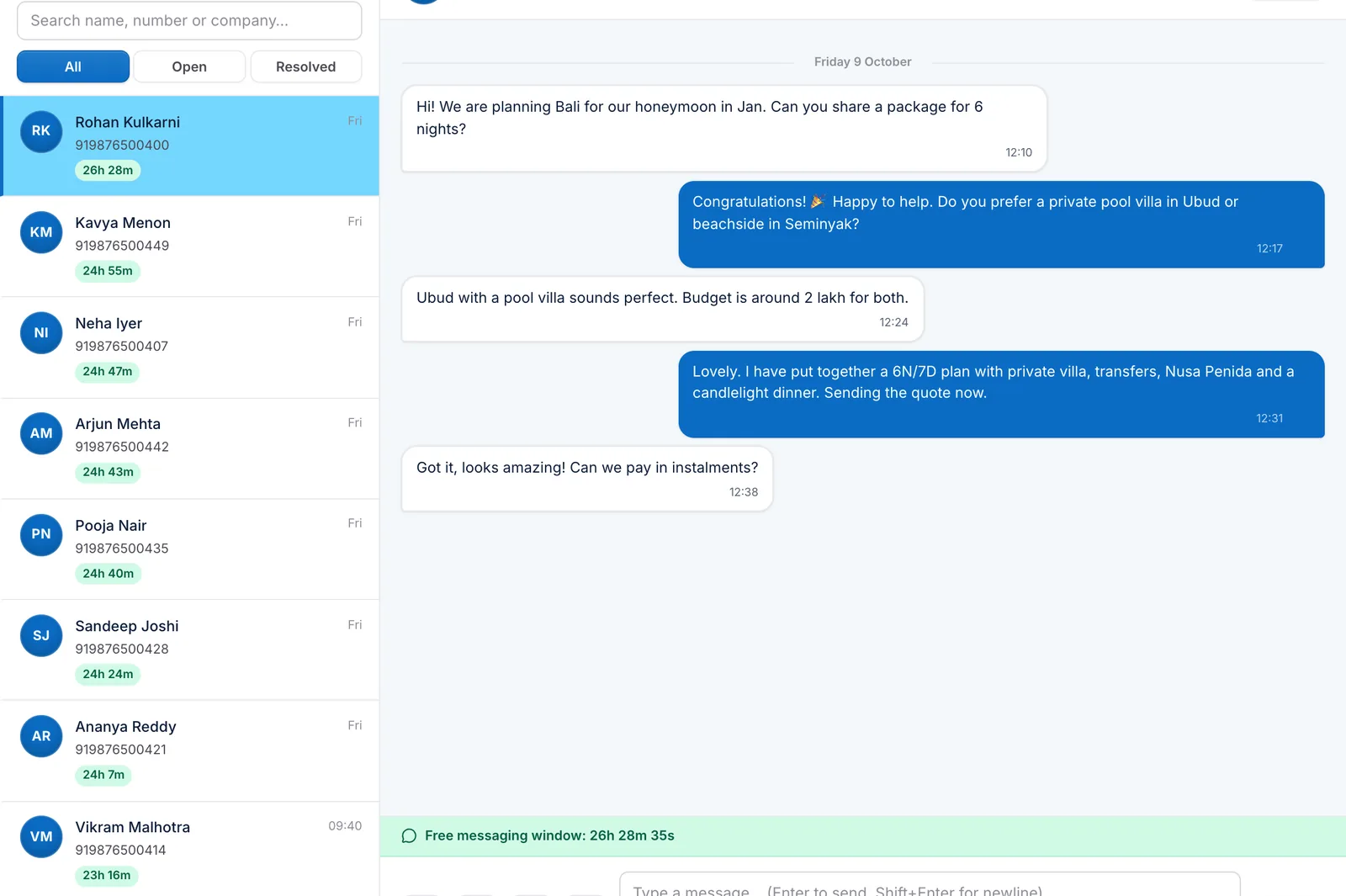
A WhatsApp CRM your travel team can share
Reply to every enquiry from one WhatsApp number, send quotes and payment links in the chat, and let automations handle the follow-ups — without breaking WhatsApp’s rules.
Why travel agents need more than the WhatsApp app
The free WhatsApp Business app is a good start, but it lives on one phone. Messages are lost when an agent leaves, nobody can see who is handling which customer, and there is no safe way to automate follow-ups. A WhatsApp CRM connects to the official WhatsApp Business Platform so your whole team can answer from one shared inbox, with every conversation tied to a trip, a quote and a payment schedule.
What you get
- Shared inbox. Assign, resolve and see unread chats; every conversation is linked to the customer’s trips and bookings.
- The 24-hour window, handled. TripSarthi shows whether a chat is inside WhatsApp’s 24-hour customer-service window. Inside it you can send free-form messages; outside it, you choose an approved template instead.
- Templates in one place. Create templates and see their Meta approval status.
- Travel automations. Seven starter flows: quote follow-up, booking confirmation, payment reminders, pre-departure checklist, passport expiry alerts, post-trip feedback and a trip-start greeting.
- Quotes and payment links in chat. Send the customer’s quote page or an instalment link without leaving the conversation.
- Opt-outs honoured. People who ask to stop are never messaged again by an automation.
Automations that understand travel
Flows are triggered by what happens to a trip — not just by a keyword. A quote is sent, viewed or goes quiet; a booking is confirmed; a payment arrives or becomes overdue; a departure is a week away; a passport is about to expire. Each flow checks the 24-hour window first: free-form text when the window is open, an approved template when it is closed, and a task for your team when neither is possible.
You stay in control of cost and policy
You connect your own WhatsApp Business number and Meta account. Meta bills conversation charges directly to you; TripSarthi adds no per-message markup. Check Meta’s current pricing for your message categories before you plan campaigns.
Set up in three steps
- Connect your WhatsApp Business Platform number in Settings.
- Install the starter automations — they are created as drafts and cannot go live until their templates are approved.
- Invite your agents and start replying from the shared inbox.
FAQ
Frequently asked questions
Do I need the WhatsApp Business API?
Yes. TripSarthi uses the official WhatsApp Business Platform with your own number, which is what allows a shared inbox, templates and safe automation.
Can several agents use the same WhatsApp number?
Yes. That is the main reason to use a WhatsApp CRM: the whole team answers from one shared inbox and conversations can be assigned and resolved.
What is the WhatsApp 24-hour rule?
When a customer messages you, you can reply with free-form messages for 24 hours. After that you can only start a conversation with an approved template message. TripSarthi shows the window on every chat and picks the right kind of message for you.
Will automations message people who opted out?
No. Opt-outs are respected everywhere, and messages are only sent in line with WhatsApp’s window and template rules.
Does TripSarthi charge for WhatsApp messages?
No. Meta bills conversation charges to your own account. TripSarthi adds no per-message markup.
Related solutions

Ready to simplify your travel business?
Create a free account, or talk to us and we’ll show you around.